INKY Dashboard v1.10.17
Improvements
Faster page loads
Pages you've opened before in this browser start loading their data sooner.
When you reload a page or come back to the dashboard in the same browser, the page starts fetching its own data without waiting for your account details: about 0.8 seconds sooner in our tests.
Account details stay on screen as you move between pages for the same team, instead of showing a loader on every visit. This covers Settings > Summary and Usage, Partner Center's Summary, Partner Licenses, PSA Integrations and Usage, and Threat Center.
Contract status on the Usage page
The Usage page (Partner Center > Usage, and Settings > Usage for direct customers) now tells an account with no current contract apart from one whose contract has ended.


When there is no live subscription on your account, the Contract End row reads No current contract, with a No subscription badge.
It shows a date with an Ended badge only once your last contract term has passed.
A new partner account that was set up ahead of its subscription shows an Early access badge beside the days remaining.
Learn more: Usage & Billing Dashboard for Partners
Tag suggestions for the message's team
Tag suggestions in Observations come from the team the message belongs to.
When you tag a message, the suggestions are the most-used tags on that message's team, not on every team you can see.
The bulk tag editor suggests tags from the selected messages' teams.
Learn more: Observations
Filter editor layout
The filter editor fits inside its dialog.
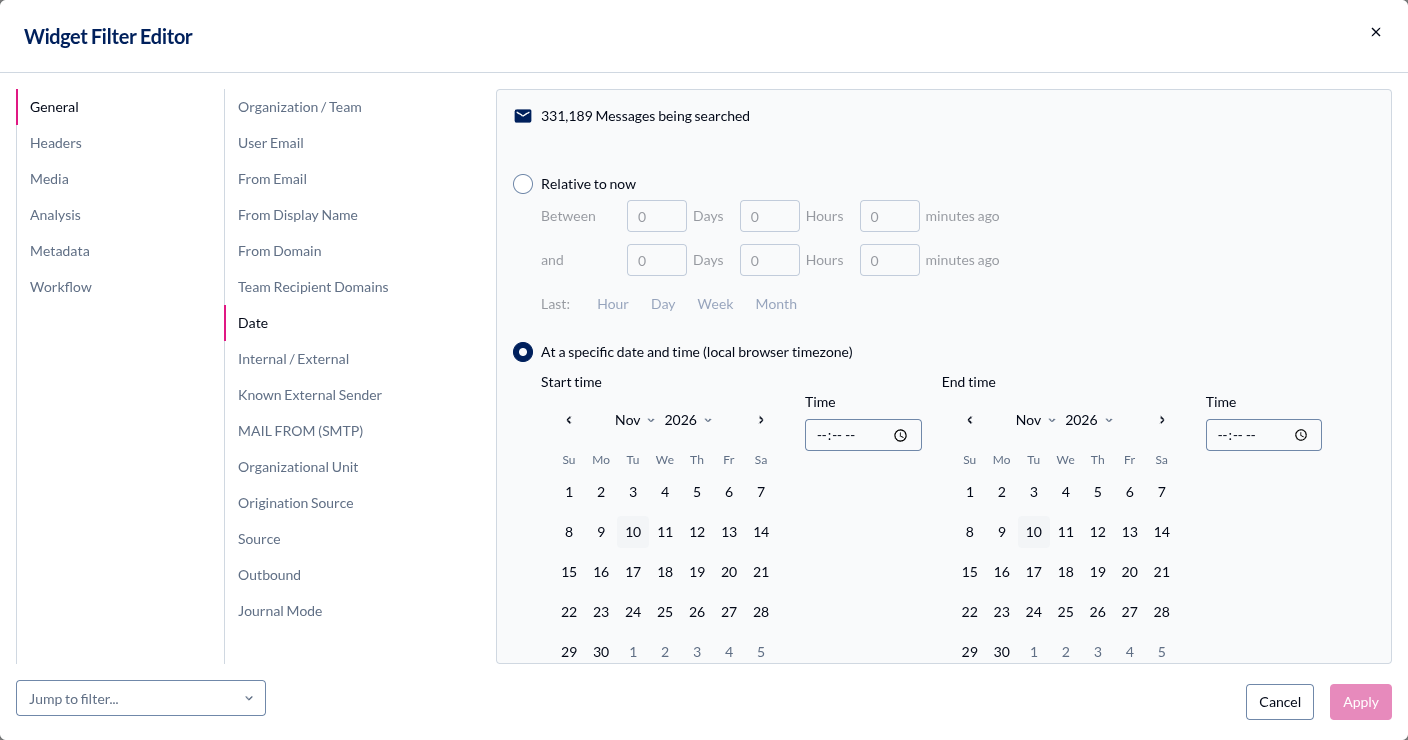
The dialog no longer scrolls as a whole. Cancel and Apply sit clear of its bottom edge, and long lists of categories, filters and values scroll in their own panes.
The funnel button for adding a filter lines up with the filter chips beside it.
Fixes
Outbound rule conditions
The outbound rule editor waits for its condition list, and its early bracket closure help is on the right checkbox.
The button that adds a condition waits until the condition options have loaded. If they can't load, it stays disabled and the editor says so, instead of failing when clicked.
Only the early bracket closure checkbox shows help about early bracket closure. Before, every checkbox in a condition showed it.
Learn more: Outbound Mail Protection
Advanced Block List and Markup settings
Advanced Block List and Markup no longer show another team's data or load forever.
Switching teams on the Advanced Block List shows the new team loading, and a late reply for the previous team no longer replaces it.
If a team's licensing can't be loaded, Advanced Block List and Markup say so instead of showing a loader that never finishes.
Learn more: Advanced Block List
Remediation dry run
A remediation dry run that fails now says why.
In Observations, when a remediation dry run failed, the confirmation stayed on Please wait while we search for the selected message... It now shows the reason, with only Cancel to close it.
Learn more: Observations
Allow, Block and Graymail lists
Searching and adding entries in the sender lists works as labeled.
Search in the Allow and Block lists matches each entry's criteria as the row shows them.
Adding a Never Graymail sender opens a dialog titled Add Never Graymail Senders, not Add Allow List Entries. Adding an Always Graymail sender opens Add Always Graymail Senders, not Add Block List Entries.
A blocked sender with an apostrophe or ampersand in the graymail list shows as typed.
Learn more: Graymail Protection
Error messages in Settings
More pages in Settings and DMARC Monitoring say what went wrong when something fails.
Tenant Operations shows the reason groups or group members failed to load, instead of a generic server error.
On Settings > Summary, a mailbox list download or team label save that fails shows as an error.
On DMARC Monitoring, a failed DMARC record lookup shows as an error, not as information.
If Enable Activity Feed or Disable Activity Feed on API Access can't reach the server, a message says so and you can use the button again.
Partner Center bulk import
Teams you import in bulk show up straight away.
After a bulk import, Go to Team Setup to complete setup opens Team Setup without reloading the page.
The imported teams appear in the team selector as soon as the import finishes.
Learn more: Getting Started
Historical Data PDF export
The Export to PDF button (the download icon) on Historical Data shows its progress and says if it fails.
The button shows a spinner while the PDF is made, and a second click does nothing.
If the export fails, a message says so and the page scrolls normally again.
Encryption portal replies
Formatting and attachments in encryption portal replies work as expected.
Justify alignment justifies the text.
When you attach several files at once, Attach Files... stays busy until every file has been added.
Learn more: Customize Encryption Portal
Signature borders in replies
When a reply to your message arrives with an INKY banner, your INKY email signature quoted in it no longer takes on the banner's color.
Before, the reply could show a border or background in the banner color around your signature.
This applies to messages you send after this update. Replies to older messages can still show it.
Learn more: Email Signatures