INKY Dashboard v1.9.1
New Features
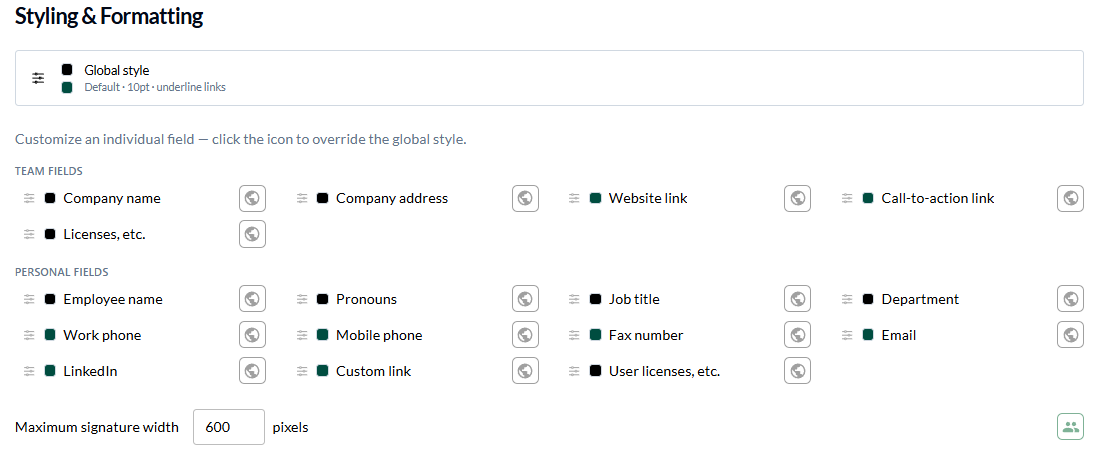
Signature editor: tabs & per-field styling
The signature editor has been redesigned into a tabbed workspace with fine-grained control over how each field looks.
Settings, Team Data, Layout, Users, and Managers are now separate tabs, so building a signature is a guided flow instead of one long form.
On the Layout tab, per-field font, weight, size, and color overrides let you style individual fields while everything else inherits your global style.
A live preview docks to the bottom of the editor — or float it or pop it into its own window — and refreshes as you edit.

Learn more about signature styling.
Redesigned Triage workspace
Triage is now organized into dedicated tabs, each with a live headline count in the tab bar, so you can jump straight to the queue that needs attention.
Dedicated Burst Management and Outbound Protection tabs, each showing a live count right in the tab bar.
Faster to scan what needs review without scrolling through one combined list.

Learn more about Triage.
Improved
Per-user burst prevention for outbound
Admins can now enable Prevent Burst for individual outbound users directly from the Burst Management panel, instead of applying it team-wide.
Account Takeover signals warning
INKY now warns you when burst, link, or spam detection is active while Account Takeover protection is turned off, so gaps in coverage are easy to spot.
Bug Fixes
Graymail Trend in reports: Graymail Trend charts now wait for data before a page is captured, so they no longer come out blank in printed or PDF reports.
Signature field-style tooltip: The field-style customizer popover no longer leaves its tooltip stuck on screen after you close it.
All Teams selector: The All Teams option is now hidden for single-team users, where selecting it could previously leave the team selector stuck.
Outbound Protection tab count: The tab now shows the correct number of active enforced users.
Reply Bait threat label: Messages classified as Reply Bait now display a proper named threat label.
Team access errors: Opening a team you don't have access to now shows a clear error instead of logging you out.